

Create an agent in chat
Who can do this: everyone in the workspace. The systems the agent should work with must be connected under Connectors first.
You describe the agent in chat. The Agent Creator builds it in the same conversation, and nothing runs until you activate it.
Steps
-
Open Agents in the sidebar and select New agent. A conversation opens and asks what the agent should do.
-
Answer in one message. Say what the agent looks at, when it runs, where the result goes and what it must ask before doing. An example is "Every weekday at 7:00, list today's arrivals with special requests and email them to the Front desk channel".
-
The Agent Creator builds the agent and says what it made. The panel beside the conversation shows the agent as a draft: when it runs, what it may use, what it does and who hears from it.
-
Ask for changes in the same conversation until the panel shows what you want. Each change is a new version of the agent.
-
Select Activate version at the bottom of the panel. If the agent has a schedule, an email address or events, they start too. Tick Start paused first to keep them paused.
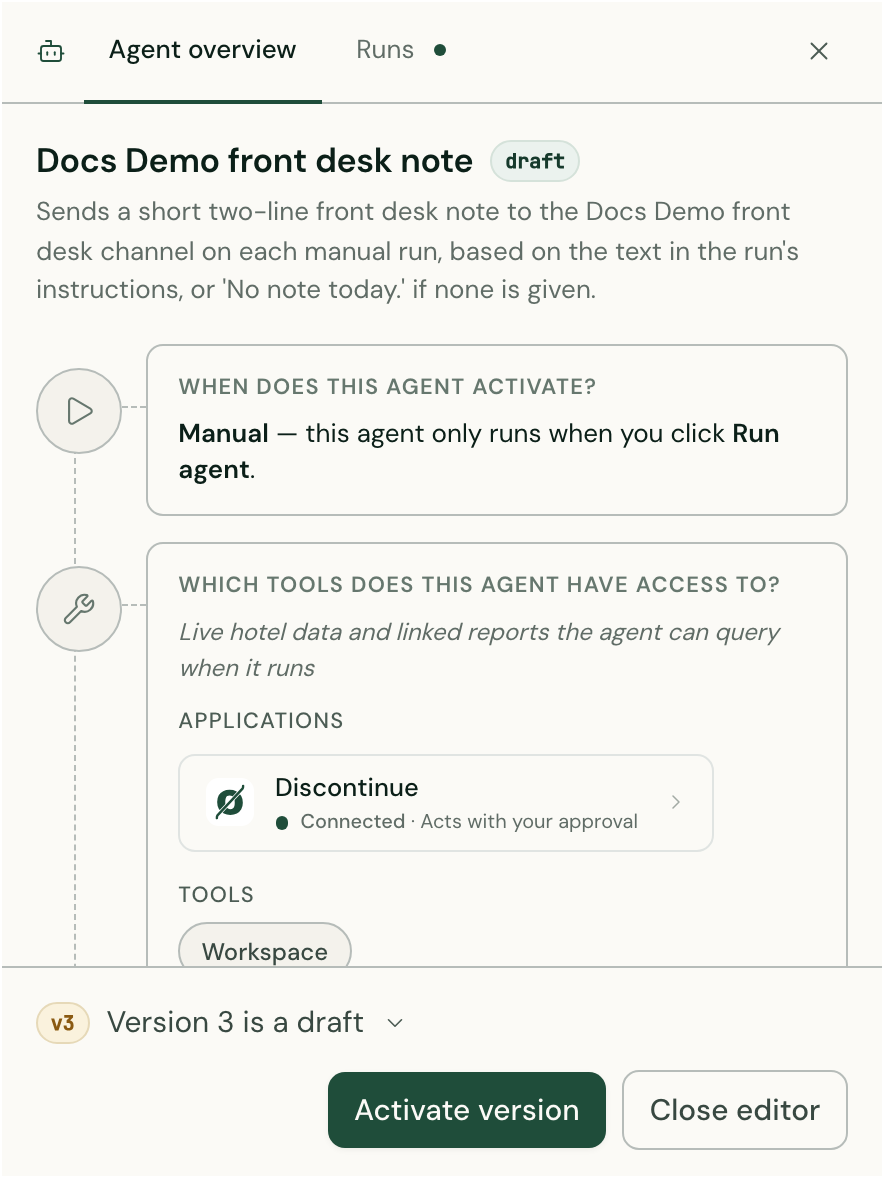
The agent panel, with the draft version and Activate version at the bottom. -
The panel opens its Runs tab. Select Run agent to watch a first run. See Run an agent.
Good to know
- An agent you never activate stays under Agents as "Draft — open to review or delete". Open it to activate or delete it.
- A draft does not take one of your plan's agents. Activating it does.
- Close editor opens the agent's page. Later changes start from Edit with AI there, in the same conversation.
- The Agent Creator uses AI credit, like every reply in chat.
If something goes wrong
- The panel says a connection "is connected for the workspace but not yet authorized for this agent". An admin selects it under Connectors in the panel and authorizes it. Then activate again.
- The panel says "Your plan has no free agent slots." Delete an agent you no longer need, or change your plan.
The rules behind this task are in the reference, under Creating an agent and Versions.