

Let an agent keep a site current
Who can do this: admins. You need a site, and an agent that runs on a computer or one you create in step 1.
An agent can change a site on each run, for example to add this week's offer. Each run edits the site's files, saves them as a draft and publishes the draft.
Steps
-
If you have no agent yet, create one in chat. Under Agents, select New agent. Say which site it changes and what it writes, for example "When I run it, put this week's breakfast special on the Docs Demo home page".
-
Open the agent's page. Under Workspace tools, select Sites, or + Add and then Sites.
-
In the Sites dialog, tick the site. The agent edits its own copy of the site's files. Nothing changes on the site until a save and a publish go through.
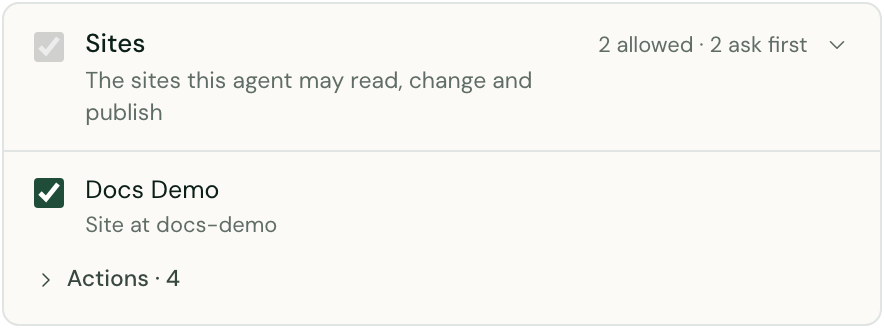
Docs Demo ticked in the Sites card. -
Under Actions, decide what the agent does without asking. Save a site and Publish a site start on Ask first, so you approve each one. Set them to Allow to let the agent save and publish on its own, or to Block. Then select Save.
-
Activate the agent and run it. When a step asks first, the request shows on the run page and in Activity, and everyone in the workspace can decide it.
Good to know
- An agent on a custom environment names it on an Environment line on its page. See Environments.
- When a file of the agent's draft changed on the live site, the publish is held. Continue the draft in chat, or run the agent again. A new run starts from the live release.
- An agent can also restore an earlier release, with the same approval as a publish.
- To take a page off the live site but keep it, tell the agent to hide the page, as Hidden pages describes.
The rules behind this task are in the reference, under Agents and sites.