

Decide what an agent may use
Who can do this: admins. You need an agent and, for a channel or a report, the channel or report itself.
An agent uses only the connections under Connectors on its Agent tab, and only what you grant there. Discontinue is the connection to your own channels, reports, sites, files and Notify list.
Steps
-
Open the agent's Agent tab. Under Connectors, select the connection, such as Discontinue.
-
Each area is a card, such as Channels or Reports. Areas the agent has nothing in yet are under Other areas. Open a card and tick what the agent may use, such as one channel.
-
Under Actions, set each action to Allow, Ask first or Block. Allow lets the agent act on its own. Ask first pauses the run until a person decides.
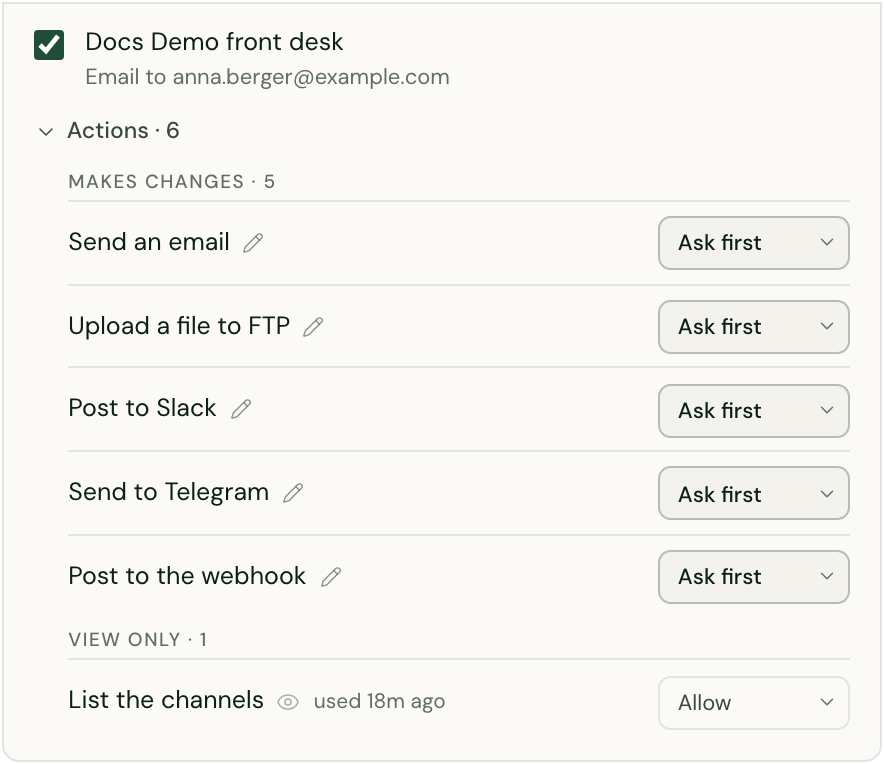
Inside the Channels card: one channel ticked, and each action's setting. -
Select Save. Nothing changes until you do.
Good to know
- The tile under Connectors sums up the access, such as Acts on its own, Acts with your approval or Read-only.
- Use read-only preset keeps the settings of actions that only read and blocks all other actions.
- To add another connection, such as your PMS, ask in Edit with AI. It must be connected under Connectors first.
- Keyrings, under Connectors, gives the agent everything on a keyring at once. Each connection keeps its own access: the agent reads on its own and asks before it writes. An agent has its own applications and logins or keyrings, not both: attaching its first keyring replaces its own, after you confirm. See Keyrings.
- Logins, under Keyrings, is what the agent's computer signs in with, such as a GitHub token for
gh. See Logins. - Access, keyrings and logins belong to the agent, not to a version. Activating another version keeps them.
- For sites, see Let an agent keep a site current.
If something goes wrong
- The tile says Authorization needed. Open it and authorize the connection for this agent.
- The tile says Credentials needed or Reconnect needed. The connection needs attention under Connectors.
The rules behind this task are in the reference, under Access and actions and The Discontinue connection.