

Decide an approval request
Who can do this: everyone in the workspace can allow a request for one run or deny it. Only admins choose Always allow and decide requests for more access.
A run pauses at every action set to Ask first. It continues once a person allows the action, and a deny ends it.
Steps
-
The people and channels on the agent's Notify list that hear Approvals get an email or a short message about the request. The run shows Needs approval, and Activity lists the request at the top.
-
Open the run from the link, from Open run in Activity or from the agent's Runs tab. Review approval at the top of the run page jumps to the request.
-
The request's first line says what the action does, such as "Send an email to the channel Docs Demo front desk". The agent's words follow under The agent says. Details adds the values and the action.
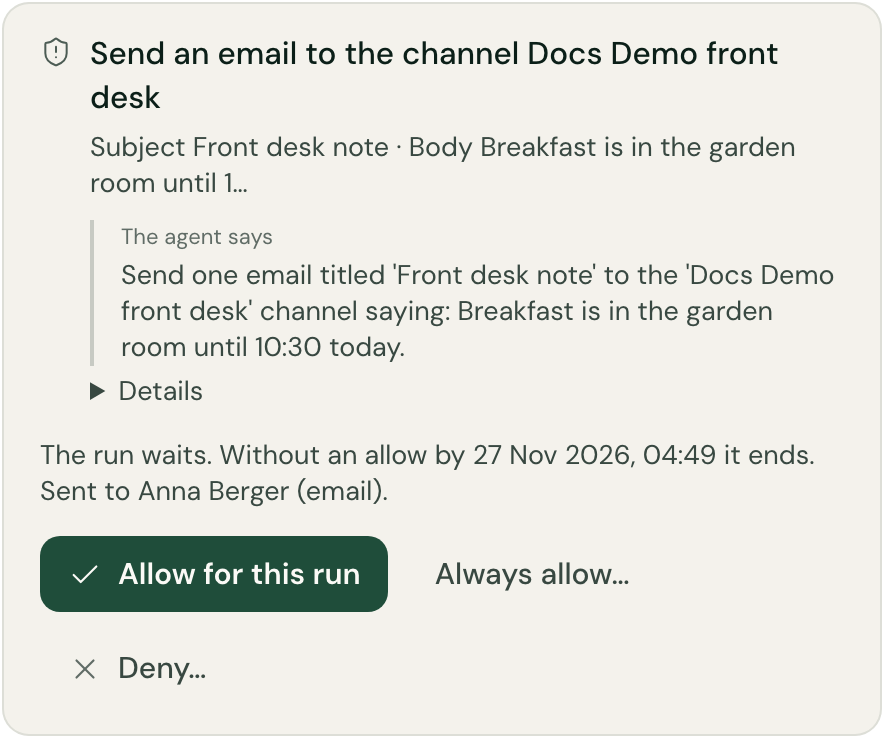
An open request, with the action, the agent's words and the three choices. -
Choose one:
- Allow for this run lets this run do it. Later runs ask again.
- Always allow… asks once more what the rule covers. Yes, always allow saves it, so this agent does it from now on without asking.
- Deny… refuses it and ends the run. You can write a reason under Reason. Then select Confirm deny.
-
An allowed run continues. A denied run stops there. The run page, its row under Runs and Activity say who denied what and why, such as "Stopped: Anna Berger denied Publish a site: not today".
Good to know
- Activity also has Approve and Deny on each request, so you can decide without opening the run.
- Decisions are made in Discontinue only. Emails and channel messages about a request carry a link to it.
- A request nobody decides within 24 hours ends the run too. The run says that nobody decided in time.
- A deny saves nothing: the next run asks again. To never allow an action, set it to Block in the agent's access.
- To change a rule that Always allow… saved, see Decide what an agent may use.
If something goes wrong
- The request says "Waiting on an admin". It asks for more access than the agent has. An admin decides it.
The rules behind this task are in the reference, under Approval requests.